Best Virtual Try-On Software for Fashion Brands in 2027

Fashion never stands still, and neither do the people who shop for it. Jewelry, eyewear, clothes, shoes, and bags keep evolving, and so do shoppers’ expectations. Yet fashion ecommerce still works much like it did on day one: a product photo and a short description. 

So shoppers fill the gaps themselves, digging through Reddit threads and YouTube reviews to find out how a necklace hangs, how big a diamond really looks, or whether those shoes will go with their new outfit. 

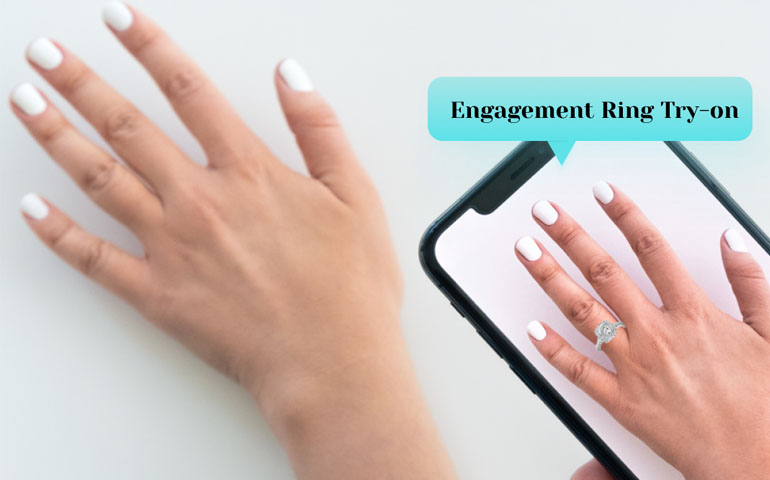
Virtual try-on software fills that gap by using AR and AI to let shoppers see how a product looks on them, right on the product page. They can check how a necklace sits, how a jacket fits, how glasses suit their face, and how to style it all, without opening a single extra tab. And as the technology keeps improving, the experience gets closer to trying the product in person.

How Does Virtual Try-On Work for Fashion Ecommerce

Virtual try-on works by using a shopper’s camera or uploaded photo to detect their face, hand, foot, or body, then placing a digital version of the product in the right spot at the right size. Computer vision tracks key points such as the fingers, wrist, eyes, or feet. AR and 3D rendering display the product on top and keep it in place as the shopper moves, while AI helps with fit, scale, and realism. All of this runs on the product page, with no extra steps, and all of this shoppers could do just from the product listing page.

Not every tool does this equally well. Five areas separate the best virtual try-on software from the rest.

5 Key Factors for Our Virtual Try-On Evaluation

The table below compares five virtual try-on platforms on the categories they cover, their starter plan price, and their public review rating. 

Criterion Why It Matters
Try-On Accuracy & Realism Shoppers trust a try-on that shows true fit, size, and detail. A realistic view builds confidence to buy and helps cut returns.
Category Coverage & Versatility Brands sell more than one product type, or plan to. One platform that covers your range saves you from managing several vendors.
Pricing & Cost Efficiency Costs can climb as traffic and catalog size grow. Knowing the monthly price and what happens at higher volume keeps your budget predictable.
Ease of Integration & Setup A tool that installs quickly with little developer help lets you go live sooner and keeps setup costs low.
Specialized Features & UX Extras like trials, analytics, and size tools improve the shopping experience and help turn try-on into sales.

Top 5 Virtual Try-On Software Compared

Software Categories Starter Pricing Review Rating
Camweara Jewelry, eyewear, watches, clothing, hats, wigs, shoes Lite: $39/month ★★★★★ 5.0 (64 reviews)
GenLook Clothing Starter: $19.99/month ★★★★★ 5.0 (40 reviews)
TryPoint Fashion Basic: $19.99/month ★★★★★ 5.0 (13 reviews)
Banuba Beauty and eyewear Basic: $249/month ★★★★☆ 4.0 (5 reviews)
Perfect Corp Makeup and eyewear Essential: $379/month ★★★★★ 4.9 (2 reviews)

The table shows how the five tools differ on categories and starter price. Here is how they compare on the five criteria that matter most to a fashion brand.

Try-On Accuracy & Realism

Reviews are the best public signal here, and Camweara leads with a 5.0 rating from 64 reviews. That is far more proof than GenLook, TryPoint, Banuba, or YouCam have. GenLook and TryPoint are solid for garments, but their review pools are smaller. Banuba and YouCam are strong in live beauty and eyewear try-on, but less relevant for fashion. 

Category Coverage & Versatility

Camweara is the strongest, covering jewelry, eyewear, watches, clothing, hats, wigs, and shoes. GenLook and TryPoint are good for apparel but limited to it. Banuba and YouCam are limited to beauty and eyewear, so they are a poor fit for most fashion catalogs.

Pricing & Cost Efficiency

GenLook and TryPoint are the cheapest at $19.99/month, but you get a narrower tool. Camweara sits in the moderate range at 39/month, which is fair value given how many categories it covers. Banuba is priced at 249/month and YouCam for $379/month which makes it expensive for what a fashion brand needs.

Ease of Integration & Setup

Camweara is the easiest to set up. It is known as a plug-and-play tool that installs from the Shopify App Store with no heavy technical work, and it comes with a free trial. The others also install from Shopify, but Banuba and YouCam are more enterprise-oriented, so they can take more effort.

Specialized Features & UX

Camweara goes beyond basic try-on. For jewelry, it offers a ring sizer. For clothing, it offers a find-my-size tool. It also includes analytics, so brands can track how shoppers use try-on. GenLook’s AI size and fit assistant is useful, and TryPoint’s pay-as-you-go billing is flexible, but neither matches that breadth.

Why Camweara Is the Best Virtual Try-On Software for Fashion Brands

The price makes that range easy to justify. At $39/month, Camweara sits between the low-cost apparel tools and the $249 to $379 beauty platforms, and it covers far more categories than either group. It installs from the Shopify App Store as a plug-and-play tool, and a free trial lets you test it on your own products before you pay.

It also helps shoppers buy with confidence. A ring sizer for jewelry, a find-my-size tool for clothing, and built-in analytics go beyond basic try-on, so shoppers can judge fit and scale while brands see how try-on is used.

For brands that want proven results, room to grow, and a quick setup, Camweara is the clear choice. Start your free trial and see how your products look on your shoppers.

Find Camweara on the Shopify App Store and add it today.

Related Post